Complex workflows
Global commerce
0-->1
Global commerce
Designing the Foundation for International Growth
Enabled global expansion and $600M in company GMV through multi-currency + multi-storefront infrastructure.
Designing the multi-currency and multi-storefront infrastructure that enabled global expansion and $600M in company GMV.
Year
2018-2023
Role
Product Design Lead/Manager
IC, Product Design Manager
Company
BigCommerce
Scope
Lead product designer, facilitation, design strategy
Lead designer, facilitator, strategy
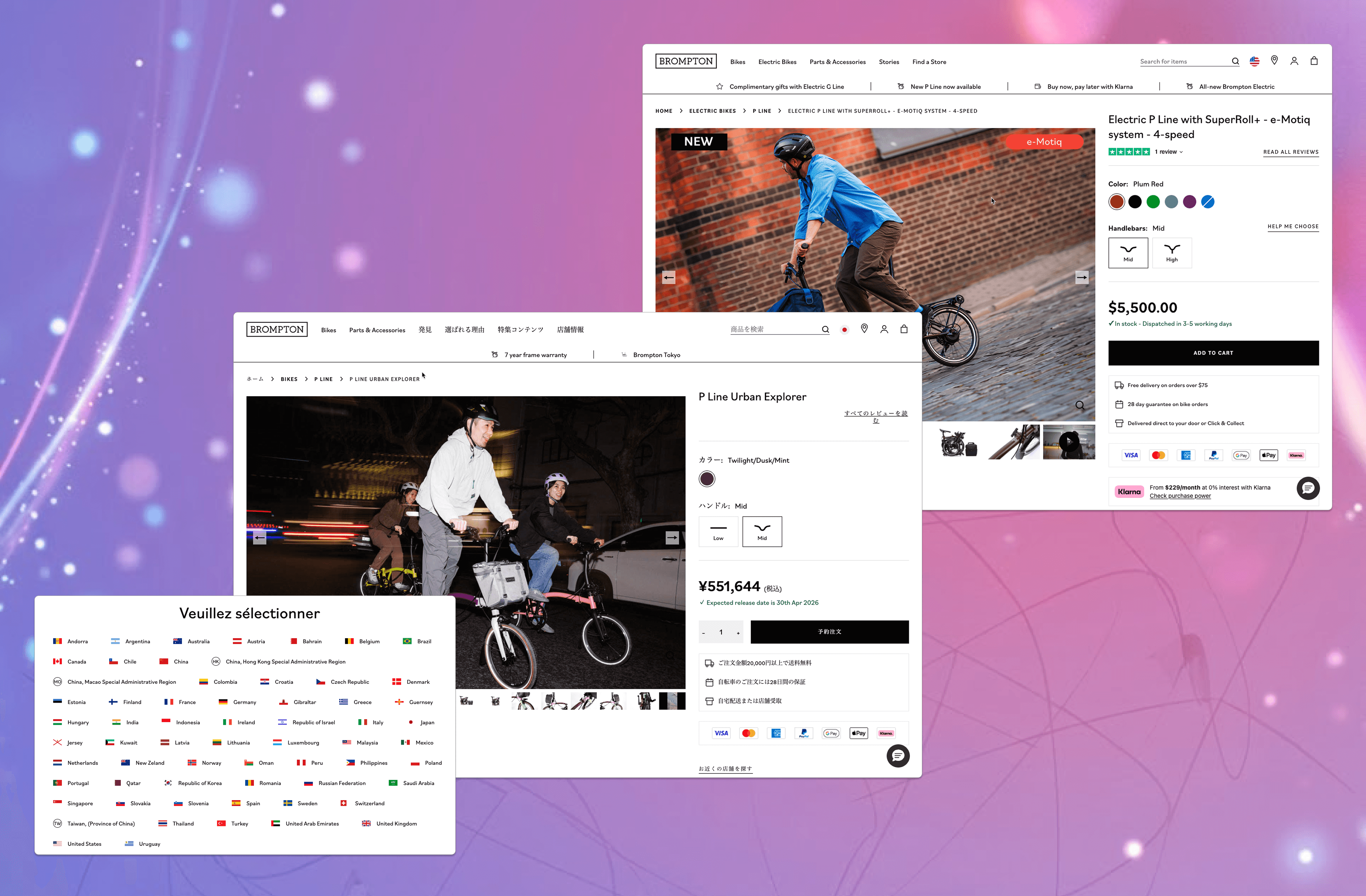
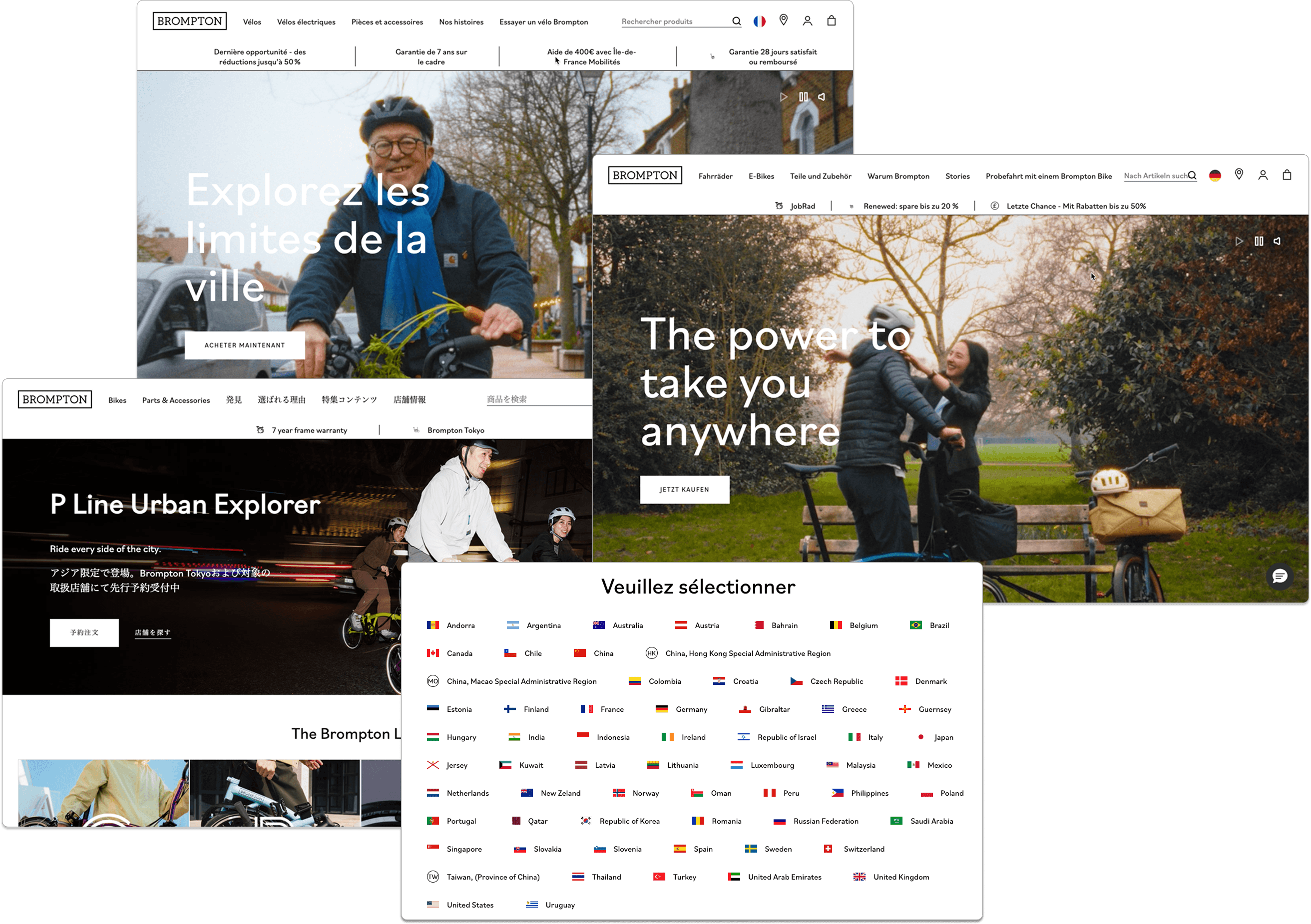
By centralizing international data into a single storefront, we enabled merchants to manage localized experiences—across multiple currencies and languages—from one central hub, ultimately unlocking $600M in global GMV.
The challenge
To sell globally, merchants faced a massive "manual tax." Expanding to a new region meant recreating every product, price point, and dataset in a separate instance — creating data fragmentation and blocking enterprise-scale growth.
The obvious ask was multi-currency. But the real problem was cross-border selling, and getting that scope right required validation and reframing. What followed became the foundation for BigCommerce's entire international feature set — unlocking $600M in GMV and setting the stage for Multi-Storefront.
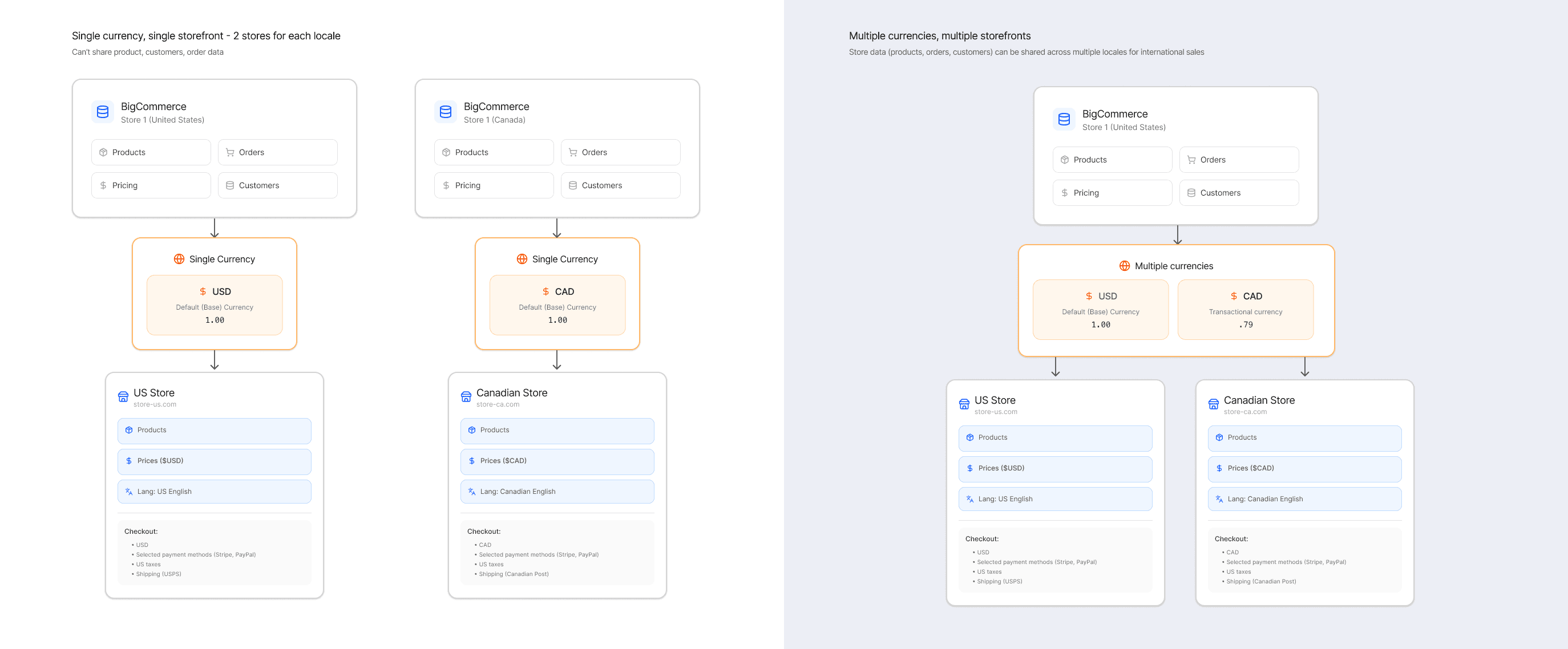
The vision was to replace the need for duplicate stores with a single-storefront architecture. Today merchants can manage global catalogs and localized shopping experiences across any currency or language—from one central store.
part 1: making multi-currency real
Multi-currency was the first step in addressing a systems design challenge that was framed initially as a feature - it was an ask from our customers who wanted to sell to other countries nearby, especially UK merchants wanting to sell to continental Europe and US wanting to sell to Canada, and vice versa.
the problem
Merchants were frustrated that their shoppers couldn't complete a purchase in their own currency. UK merchants wanted to sell into Europe. US merchants wanted to sell into Canada. Instead of a native solution, they were stitching together separate storefronts, custom price lists, and localized payment configs just to transact across a border.
My role
I partnered with product and engineering to define an experience that would cut across payments, pricing, checkout, promotions, orders, and customers — not just solve currency conversion, but lay the foundation for a broader international feature set.
I started out by understanding and mapping out what it would take to set up a transactional currency.
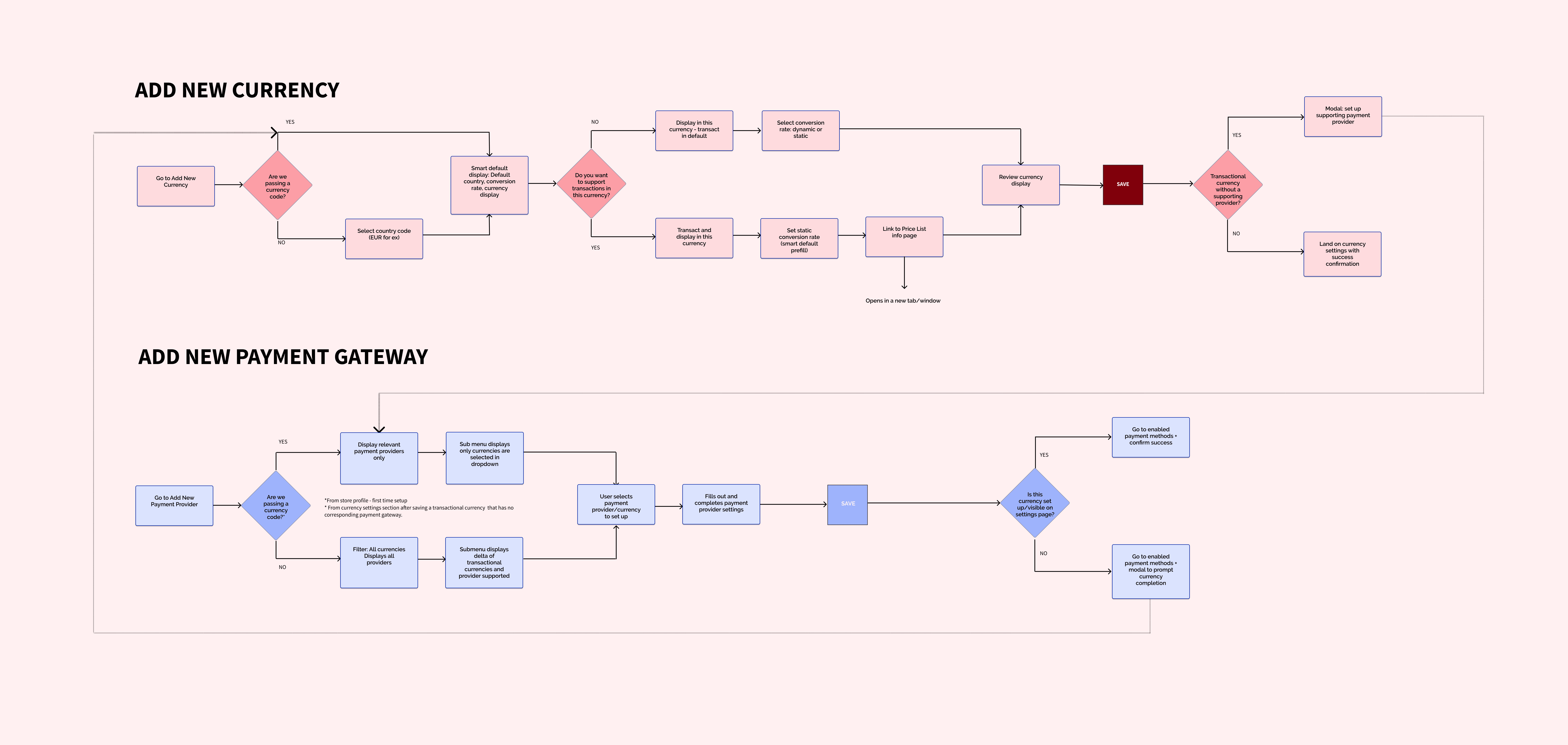
I came up with an architectural approach to setup - currency depended on setting up the right payment gateway before it could be transactional for the shopper.
transactional vs display currency
A currency could exist in two very different states — truly enabled for transaction, or display-only with checkout still settling in the default currency. This gap wasn't obvious to merchants, and the confusion was real. I introduced the distinction between transactional and display currency to give merchants a clear mental model: one meant their payment gateway was fully connected, the other meant shoppers saw local prices but bore the conversion cost. Naming that difference was as much a design decision as any UI choice.
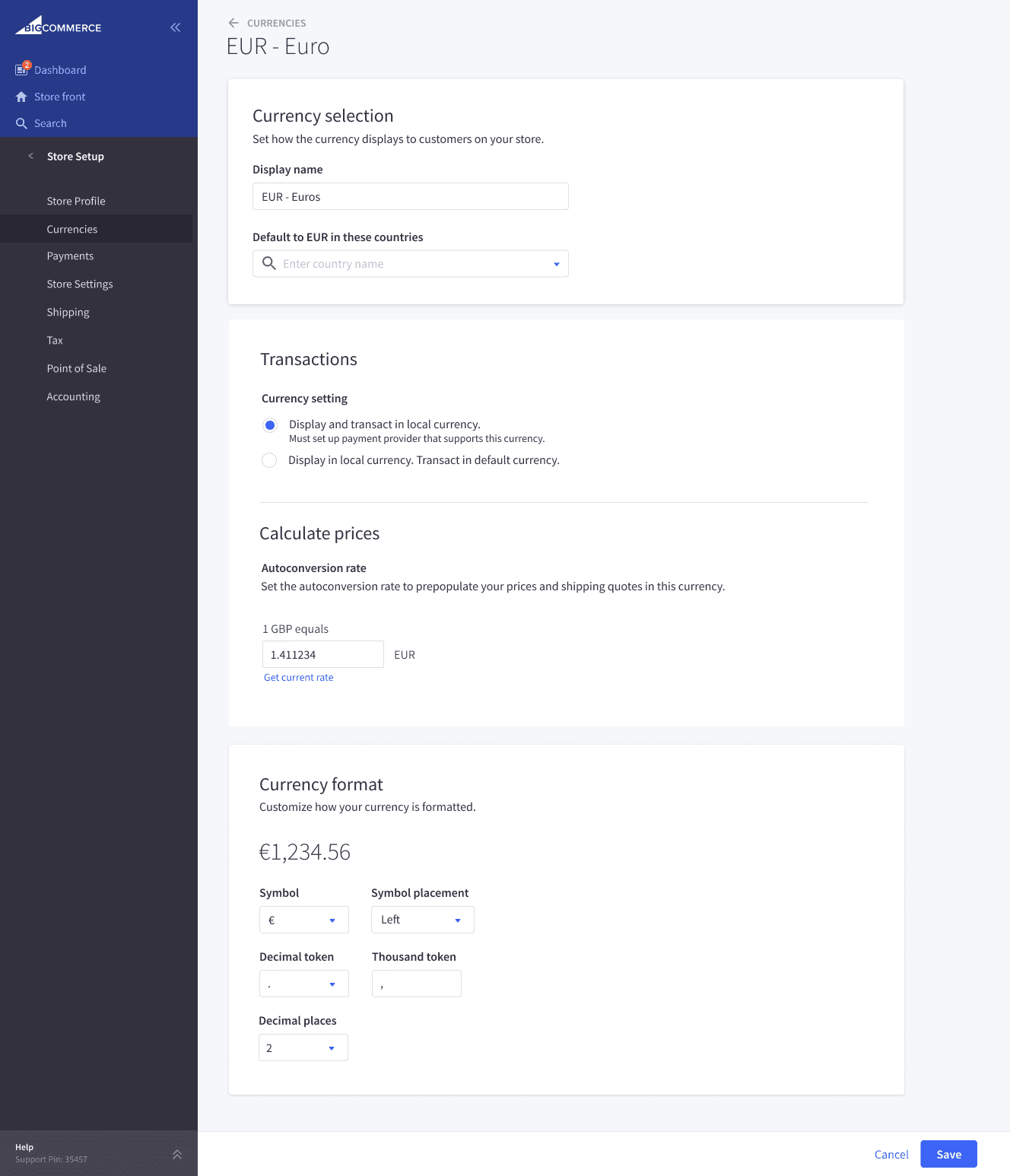
I created a way for the merchant to choose between a transactional or display currency, enabling those who wanted a transactional currency, which required a payment gateway setup.
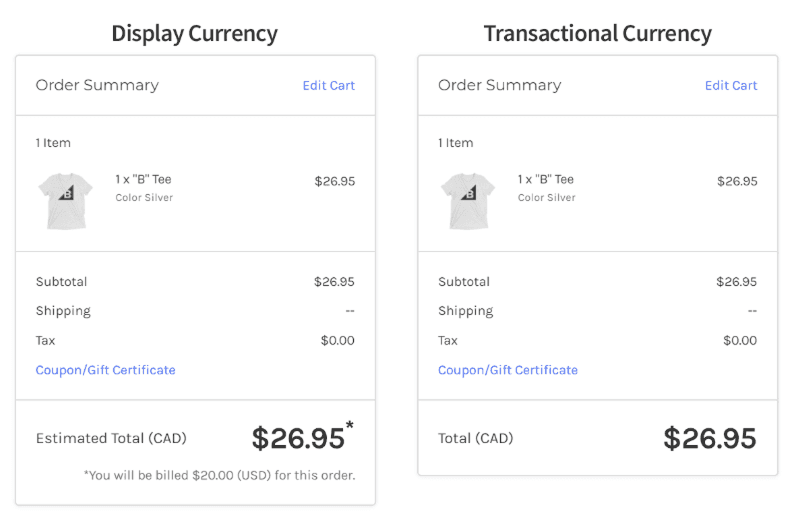
If the shopper saw a display currency, they got a message letting them know that the transaction would occur in the default currency.
key design decisionS
Adding net-new functionality into an existing architecture meant figuring out where currency setup actually lived in the product. I proposed a dedicated Currencies section in Settings, positioned adjacent to Payments — so merchants could set up a currency and immediately connect the right payment gateway in one logical flow. The ideal would have been a guided setup experience, but that fell outside scope. What we shipped was structural: a home for currency that made the dependency between pricing and payments legible, even without a polished onboarding flow.
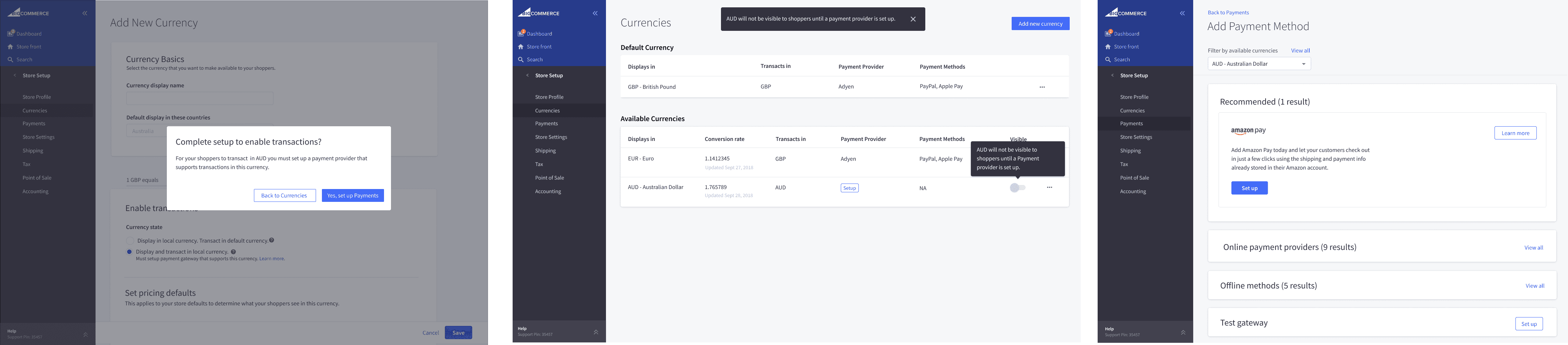
Currencies were discoverable in the settings, and I added mechanisms including a currency filter on payments to let the user know which payment gateways were compatible.
research: what we learned
I tested these prototypes and learned that was a clear split between SMBs and mid-market merchants.
Mid-market merchants were already running multiple stores just to handle different currencies. They thought about pricing by market first, currency second — which meant auto-conversion was the wrong abstraction entirely. They wanted to set €17 in Europe deliberately, not let an exchange rate decide it.
SMBs preferred auto-conversion to avoid manual upkeep — unless they had real cross-border exposure, at which point they started sounding like their mid-market counterparts.
The sharpest insight was the transactional vs. display currency gap. Merchants had been tolerating multi-store complexity specifically because display-only pricing — showing local currency but charging in USD — was killing checkout trust. That reframed the project: transactional currency wasn't a nice-to-have, it was the core problem. And the near-universal preference for fixed pricing validated the pivot to Price Lists before a single spec was written.
User research uncovered a fundamental divide in pricing strategy:
Mid-market merchants prioritized precision, seeking to set deliberate prices (e.g., a flat €17) to maintain market-specific margins.
Conversely, SMBs leaned into automation, preferring auto-conversion to minimize operational overhead and manual upkeep."
merchants wanted precision over automation
Our initial hypothesis was that merchants wanted automated, live exchange rates to simplify pricing. However, our prototype testing with mid-market and enterprise merchants revealed a critical gap: live rates lacked the predictability required for margin protection.
Testing showed that these users prioritized control over convenience. In response, I expanded the design strategy from a simple currency converter to using price overrides. This allowed merchants to bypass market fluctuations and set fixed, localized prices, providing the exactness their business models demanded.
This allowed a merchant to sell a product for USD $20, but offer it at €17 in Europe, as an example.
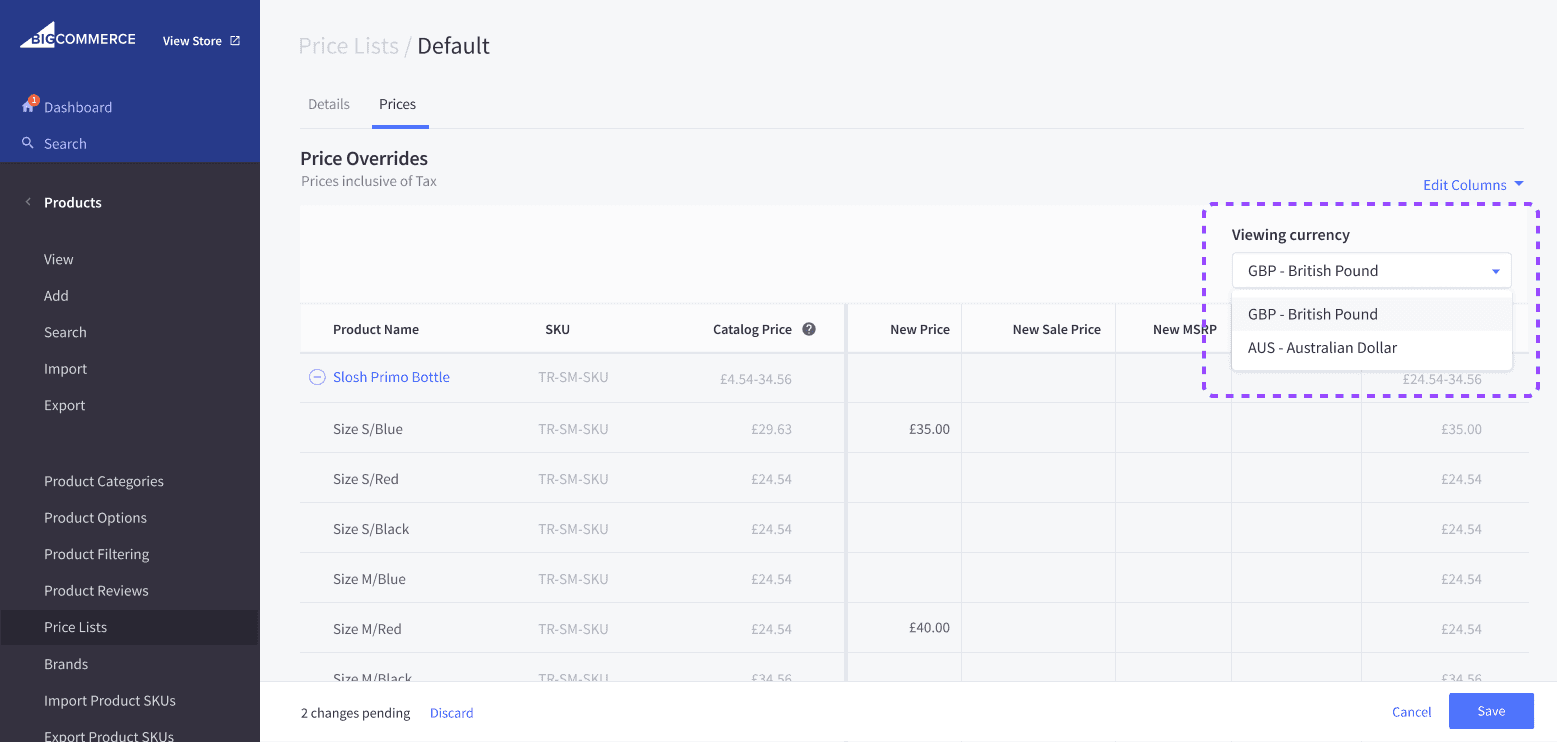
To address the feedback from merchants that they wanted precise prices, I proposed we extend Price lists to support prices in different currencies. This could be surfaced to shoppers based on IP or displayed to specified customer groups, depending on the use case.
the results
Launched in February 2020, multi-currency rolled out across all plan types — enabling merchants to present, transact, and settle in over 100 currencies natively.
The impact was immediate: merchants reported up to 40% increases in cross-border sales and significant drops in cart abandonment. The feature gave the sales team a foothold in international markets. The following year, international revenue grew to over 17% of total sales.
The price list addition proved its value — merchants credited the ability to set fixed regional prices, rather than relying on live exchange rates, as key to staying competitive in international markets. It was the first building block of BigCommerce's full international commerce platform.
However, the road to achieving full support for cross-border sales was long, and multi-storefront was the next chapter.
Number of currencies supported
0+
0+
Increase in cross-border sales
0%
0%
Growth of international revenue in 2020
Growth of international revenue in 2020
10%
10%
Part 2: kicking off multi-storefront
With multi-currency in place, we moved to one of the most complex undertakings in the platform’s history: Multi-Storefront (MSF).
Creating alignment for a cross functional team
With multi-currency in place, the next challenge was the most architecturally complex in the platform's history: Multi-Storefront. MSF meant a merchant could run entirely separate storefronts — different domains, themes, pricing, promotions, checkout settings, and customer groups — all from a single control panel. The scope touched nearly every domain in the platform.
Given that scale, I lobbied for a cross-functional offsite with design, product, and engineering to establish alignment before a single screen was designed. With the help of a PM Director and my CPO, we moved the team from abstract concepts to a shared mental model of how a single global catalog would branch into localized storefronts. We mapped assumptions, visualized dependencies, and set a directional foundation for the work ahead.
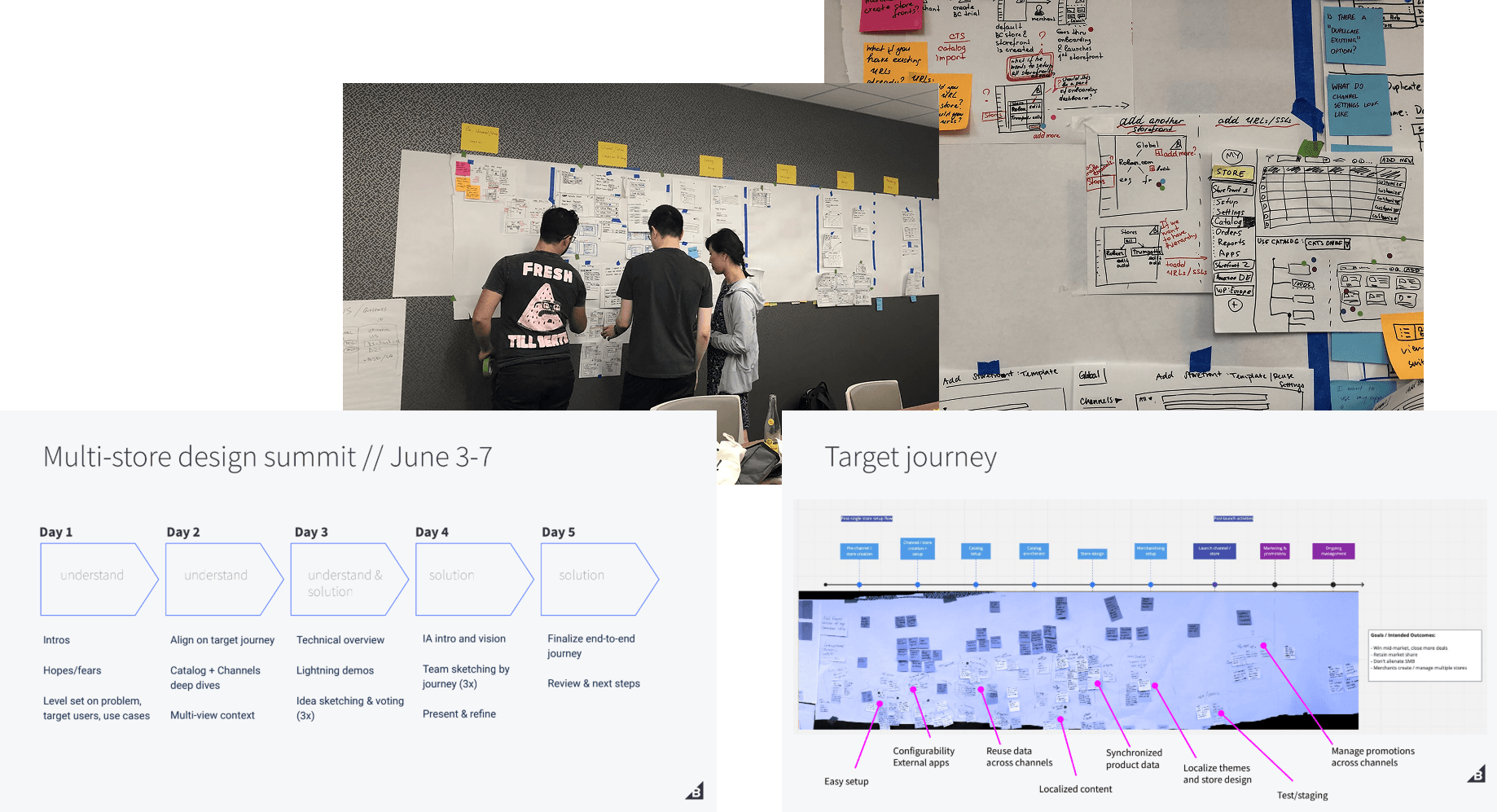
I organized a cross-functional offsite to align distributed teams, map assumptions, and explore early design directions for channel setup and catalog management.
multi-storefront — a multi-year journey
From there, execution was handed to a dedicated team — including engineers we'd hired in Ukraine and a lead designer who owned the cross-functional work — with the project spanning years of phased implementation across multiple domains. The complexity meant we couldn't design it holistically upfront. Different teams made different implementation decisions along the way, accumulating UX debt we'd eventually return to.
I later inherited the Ukraine team, who had largely dispersed because of the war, and oversaw much of the evolution of the building blocks making up multi-storefront. The addition of headless storefronts and Makeswift, a visual editor we acquired, deepened the offering and helped establish MSF as a genuine platform differentiator.
By the time multi-storefront reached maturity, the international feature set had become one of BigCommerce's strongest competitive advantages — but shipping at that scale, across that many teams and domains, surfaced problems we hadn't fully anticipated until merchants hit them in production.
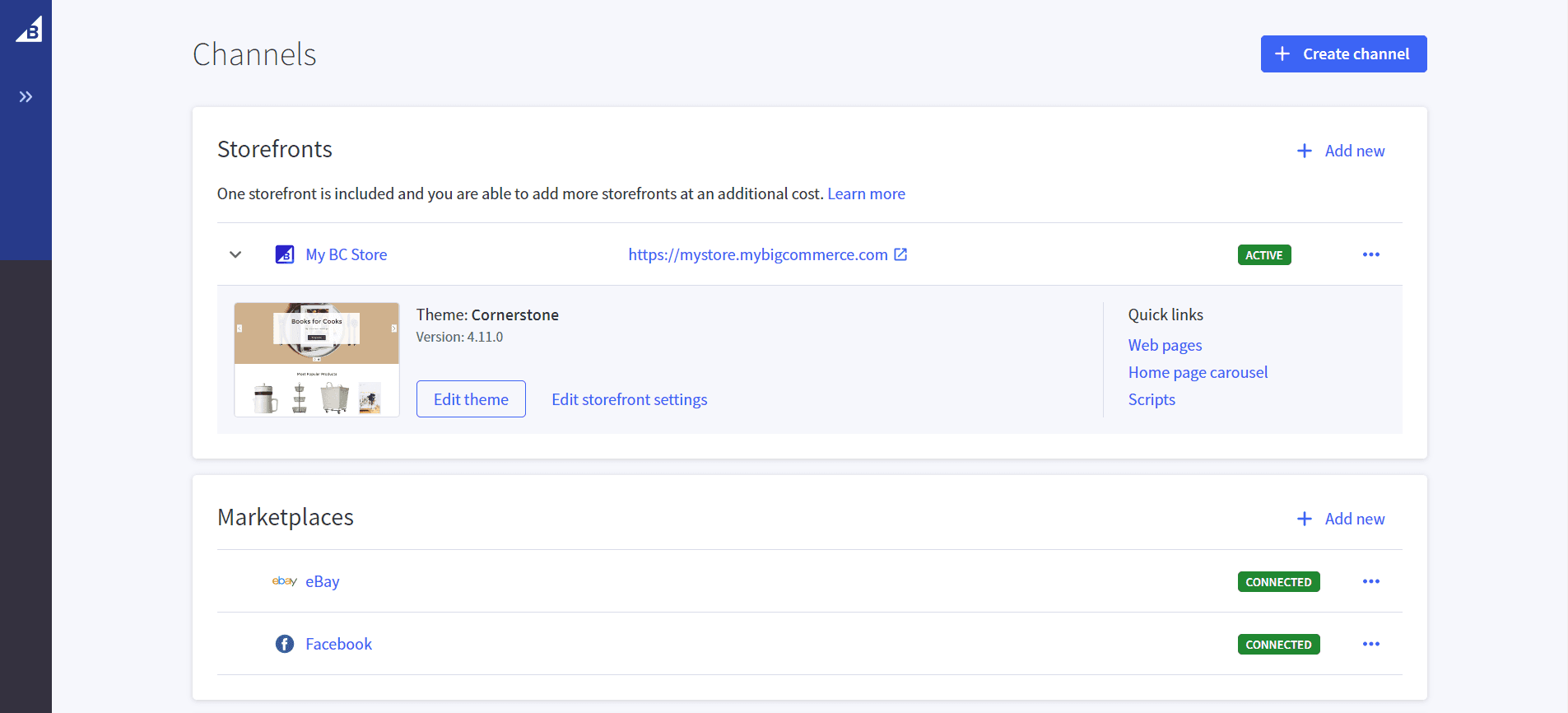
Channel manager was where multiple storefronts could be discovered, added and managed, along with other sales channels for listing products, like Facebook, TikTok and Google.
reflection
This project started as a currency feature and became something closer to a platform shift. That reframe — from feature to foundation — is the through-line I'd carry into any systems-level design challenge.
A few things I'd do differently: I would have pushed earlier for a guided setup flow connecting currency and payment gateway configuration. We knew the dependency was confusing merchants, and descoping the onboarding experience left a gap we never fully closed. I'd also have brought tax compliance research into scope earlier — the EMEA requirements weren't a focus but could have been discovered had the right partners been involved.
The bigger lesson was about what it means to design infrastructure versus UI. The most consequential decisions I made on this project weren't screens — they were the naming of transactional versus display currency, the pivot to Price Lists, the offsite that gave a distributed team a shared mental model before a single component was built. Those choices shaped everything downstream.
When you're designing a foundation, you're not just solving for the user in front of you. You're making decisions that constrain and enable every team that builds on top of you. That's a different kind of design responsibility — and one I'd sign up for again.
Complex workflows
Global commerce
0-->1
Global commerce
Designing the Foundation for International Growth
Enabled global expansion and $600M in company GMV through multi-currency + multi-storefront infrastructure.
Designing the multi-currency and multi-storefront infrastructure that enabled global expansion and $600M in company GMV.
Year
2018-2023
Role
Product Design Lead/Manager
IC, Product Design Manager
Company
BigCommerce
Scope
Lead product designer, facilitation, design strategy
Lead designer, facilitator, strategy
By centralizing international data into a single storefront, we enabled merchants to manage localized experiences—across multiple currencies and languages—from one central hub, ultimately unlocking $600M in global GMV.
The challenge
To sell globally, merchants faced a massive "manual tax." Expanding to a new region meant recreating every product, price point, and dataset in a separate instance — creating data fragmentation and blocking enterprise-scale growth.
The obvious ask was multi-currency. But the real problem was cross-border selling, and getting that scope right required validation and reframing. What followed became the foundation for BigCommerce's entire international feature set — unlocking $600M in GMV and setting the stage for Multi-Storefront.
The vision was to replace the need for duplicate stores with a single-storefront architecture. Today merchants can manage global catalogs and localized shopping experiences across any currency or language—from one central store.
part 1: making multi-currency real
Multi-currency was the first step in addressing a systems design challenge that was framed initially as a feature - it was an ask from our customers who wanted to sell to other countries nearby, especially UK merchants wanting to sell to continental Europe and US wanting to sell to Canada, and vice versa.
the problem
Merchants were frustrated that their shoppers couldn't complete a purchase in their own currency. UK merchants wanted to sell into Europe. US merchants wanted to sell into Canada. Instead of a native solution, they were stitching together separate storefronts, custom price lists, and localized payment configs just to transact across a border.
My role
I partnered with product and engineering to define an experience that would cut across payments, pricing, checkout, promotions, orders, and customers — not just solve currency conversion, but lay the foundation for a broader international feature set.
I started out by understanding and mapping out what it would take to set up a transactional currency.
I came up with an architectural approach to setup - currency depended on setting up the right payment gateway before it could be transactional for the shopper.
transactional vs display currency
A currency could exist in two very different states — truly enabled for transaction, or display-only with checkout still settling in the default currency. This gap wasn't obvious to merchants, and the confusion was real. I introduced the distinction between transactional and display currency to give merchants a clear mental model: one meant their payment gateway was fully connected, the other meant shoppers saw local prices but bore the conversion cost. Naming that difference was as much a design decision as any UI choice.
I created a way for the merchant to choose between a transactional or display currency, enabling those who wanted a transactional currency, which required a payment gateway setup.
If the shopper saw a display currency, they got a message letting them know that the transaction would occur in the default currency.
key design decisionS
Adding net-new functionality into an existing architecture meant figuring out where currency setup actually lived in the product. I proposed a dedicated Currencies section in Settings, positioned adjacent to Payments — so merchants could set up a currency and immediately connect the right payment gateway in one logical flow. The ideal would have been a guided setup experience, but that fell outside scope. What we shipped was structural: a home for currency that made the dependency between pricing and payments legible, even without a polished onboarding flow.
Currencies were discoverable in the settings, and I added mechanisms including a currency filter on payments to let the user know which payment gateways were compatible.
research: what we learned
I tested these prototypes and learned that was a clear split between SMBs and mid-market merchants.
Mid-market merchants were already running multiple stores just to handle different currencies. They thought about pricing by market first, currency second — which meant auto-conversion was the wrong abstraction entirely. They wanted to set €17 in Europe deliberately, not let an exchange rate decide it.
SMBs preferred auto-conversion to avoid manual upkeep — unless they had real cross-border exposure, at which point they started sounding like their mid-market counterparts.
The sharpest insight was the transactional vs. display currency gap. Merchants had been tolerating multi-store complexity specifically because display-only pricing — showing local currency but charging in USD — was killing checkout trust. That reframed the project: transactional currency wasn't a nice-to-have, it was the core problem. And the near-universal preference for fixed pricing validated the pivot to Price Lists before a single spec was written.
User research uncovered a fundamental divide in pricing strategy:
Mid-market merchants prioritized precision, seeking to set deliberate prices (e.g., a flat €17) to maintain market-specific margins.
Conversely, SMBs leaned into automation, preferring auto-conversion to minimize operational overhead and manual upkeep."
merchants wanted precision over automation
Our initial hypothesis was that merchants wanted automated, live exchange rates to simplify pricing. However, our prototype testing with mid-market and enterprise merchants revealed a critical gap: live rates lacked the predictability required for margin protection.
Testing showed that these users prioritized control over convenience. In response, I expanded the design strategy from a simple currency converter to using price overrides. This allowed merchants to bypass market fluctuations and set fixed, localized prices, providing the exactness their business models demanded.
This allowed a merchant to sell a product for USD $20, but offer it at €17 in Europe, as an example.
To address the feedback from merchants that they wanted precise prices, I proposed we extend Price lists to support prices in different currencies. This could be surfaced to shoppers based on IP or displayed to specified customer groups, depending on the use case.
the results
Launched in February 2020, multi-currency rolled out across all plan types — enabling merchants to present, transact, and settle in over 100 currencies natively.
The impact was immediate: merchants reported up to 40% increases in cross-border sales and significant drops in cart abandonment. The feature gave the sales team a foothold in international markets. The following year, international revenue grew to over 17% of total sales.
The price list addition proved its value — merchants credited the ability to set fixed regional prices, rather than relying on live exchange rates, as key to staying competitive in international markets. It was the first building block of BigCommerce's full international commerce platform.
However, the road to achieving full support for cross-border sales was long, and multi-storefront was the next chapter.
Number of currencies supported
0+
0+
Increase in cross-border sales
0%
0%
Growth of international revenue in 2020
Growth of international revenue in 2020
10%
10%
Part 2: kicking off multi-storefront
With multi-currency in place, we moved to one of the most complex undertakings in the platform’s history: Multi-Storefront (MSF).
Creating alignment for a cross functional team
With multi-currency in place, the next challenge was the most architecturally complex in the platform's history: Multi-Storefront. MSF meant a merchant could run entirely separate storefronts — different domains, themes, pricing, promotions, checkout settings, and customer groups — all from a single control panel. The scope touched nearly every domain in the platform.
Given that scale, I lobbied for a cross-functional offsite with design, product, and engineering to establish alignment before a single screen was designed. With the help of a PM Director and my CPO, we moved the team from abstract concepts to a shared mental model of how a single global catalog would branch into localized storefronts. We mapped assumptions, visualized dependencies, and set a directional foundation for the work ahead.
I organized a cross-functional offsite to align distributed teams, map assumptions, and explore early design directions for channel setup and catalog management.
multi-storefront — a multi-year journey
From there, execution was handed to a dedicated team — including engineers we'd hired in Ukraine and a lead designer who owned the cross-functional work — with the project spanning years of phased implementation across multiple domains. The complexity meant we couldn't design it holistically upfront. Different teams made different implementation decisions along the way, accumulating UX debt we'd eventually return to.
I later inherited the Ukraine team, who had largely dispersed because of the war, and oversaw much of the evolution of the building blocks making up multi-storefront. The addition of headless storefronts and Makeswift, a visual editor we acquired, deepened the offering and helped establish MSF as a genuine platform differentiator.
By the time multi-storefront reached maturity, the international feature set had become one of BigCommerce's strongest competitive advantages — but shipping at that scale, across that many teams and domains, surfaced problems we hadn't fully anticipated until merchants hit them in production.
Channel manager was where multiple storefronts could be discovered, added and managed, along with other sales channels for listing products, like Facebook, TikTok and Google.
reflection
This project started as a currency feature and became something closer to a platform shift. That reframe — from feature to foundation — is the through-line I'd carry into any systems-level design challenge.
A few things I'd do differently: I would have pushed earlier for a guided setup flow connecting currency and payment gateway configuration. We knew the dependency was confusing merchants, and descoping the onboarding experience left a gap we never fully closed. I'd also have brought tax compliance research into scope earlier — the EMEA requirements weren't a focus but could have been discovered had the right partners been involved.
The bigger lesson was about what it means to design infrastructure versus UI. The most consequential decisions I made on this project weren't screens — they were the naming of transactional versus display currency, the pivot to Price Lists, the offsite that gave a distributed team a shared mental model before a single component was built. Those choices shaped everything downstream.
When you're designing a foundation, you're not just solving for the user in front of you. You're making decisions that constrain and enable every team that builds on top of you. That's a different kind of design responsibility — and one I'd sign up for again.
Complex workflows
Global commerce
0-->1
Global commerce
Designing the Foundation for International Growth
Enabled global expansion and $600M in company GMV through multi-currency + multi-storefront infrastructure.
Designing the multi-currency and multi-storefront infrastructure that enabled global expansion and $600M in company GMV.
Year
2018-2023
Role
Product Design Lead/Manager
IC, Product Design Manager
Company
BigCommerce
Scope
Lead product designer, facilitation, design strategy
Lead designer, facilitator, strategy
By centralizing international data into a single storefront, we enabled merchants to manage localized experiences—across multiple currencies and languages—from one central hub, ultimately unlocking $600M in global GMV.
The challenge
To sell globally, merchants faced a massive "manual tax." Expanding to a new region meant recreating every product, price point, and dataset in a separate instance — creating data fragmentation and blocking enterprise-scale growth.
The obvious ask was multi-currency. But the real problem was cross-border selling, and getting that scope right required validation and reframing. What followed became the foundation for BigCommerce's entire international feature set — unlocking $600M in GMV and setting the stage for Multi-Storefront.
The vision was to replace the need for duplicate stores with a single-storefront architecture. Today merchants can manage global catalogs and localized shopping experiences across any currency or language—from one central store.
part 1: making multi-currency real
Multi-currency was the first step in addressing a systems design challenge that was framed initially as a feature - it was an ask from our customers who wanted to sell to other countries nearby, especially UK merchants wanting to sell to continental Europe and US wanting to sell to Canada, and vice versa.
the problem
Merchants were frustrated that their shoppers couldn't complete a purchase in their own currency. UK merchants wanted to sell into Europe. US merchants wanted to sell into Canada. Instead of a native solution, they were stitching together separate storefronts, custom price lists, and localized payment configs just to transact across a border.
My role
I partnered with product and engineering to define an experience that would cut across payments, pricing, checkout, promotions, orders, and customers — not just solve currency conversion, but lay the foundation for a broader international feature set.
I started out by understanding and mapping out what it would take to set up a transactional currency.
I came up with an architectural approach to setup - currency depended on setting up the right payment gateway before it could be transactional for the shopper.
transactional vs display currency
A currency could exist in two very different states — truly enabled for transaction, or display-only with checkout still settling in the default currency. This gap wasn't obvious to merchants, and the confusion was real. I introduced the distinction between transactional and display currency to give merchants a clear mental model: one meant their payment gateway was fully connected, the other meant shoppers saw local prices but bore the conversion cost. Naming that difference was as much a design decision as any UI choice.
I created a way for the merchant to choose between a transactional or display currency, enabling those who wanted a transactional currency, which required a payment gateway setup.
If the shopper saw a display currency, they got a message letting them know that the transaction would occur in the default currency.
key design decisionS
Adding net-new functionality into an existing architecture meant figuring out where currency setup actually lived in the product. I proposed a dedicated Currencies section in Settings, positioned adjacent to Payments — so merchants could set up a currency and immediately connect the right payment gateway in one logical flow. The ideal would have been a guided setup experience, but that fell outside scope. What we shipped was structural: a home for currency that made the dependency between pricing and payments legible, even without a polished onboarding flow.
Currencies were discoverable in the settings, and I added mechanisms including a currency filter on payments to let the user know which payment gateways were compatible.
research: what we learned
I tested these prototypes and learned that was a clear split between SMBs and mid-market merchants.
Mid-market merchants were already running multiple stores just to handle different currencies. They thought about pricing by market first, currency second — which meant auto-conversion was the wrong abstraction entirely. They wanted to set €17 in Europe deliberately, not let an exchange rate decide it.
SMBs preferred auto-conversion to avoid manual upkeep — unless they had real cross-border exposure, at which point they started sounding like their mid-market counterparts.
The sharpest insight was the transactional vs. display currency gap. Merchants had been tolerating multi-store complexity specifically because display-only pricing — showing local currency but charging in USD — was killing checkout trust. That reframed the project: transactional currency wasn't a nice-to-have, it was the core problem. And the near-universal preference for fixed pricing validated the pivot to Price Lists before a single spec was written.
User research uncovered a fundamental divide in pricing strategy:
Mid-market merchants prioritized precision, seeking to set deliberate prices (e.g., a flat €17) to maintain market-specific margins.
Conversely, SMBs leaned into automation, preferring auto-conversion to minimize operational overhead and manual upkeep."
merchants wanted precision over automation
Our initial hypothesis was that merchants wanted automated, live exchange rates to simplify pricing. However, our prototype testing with mid-market and enterprise merchants revealed a critical gap: live rates lacked the predictability required for margin protection.
Testing showed that these users prioritized control over convenience. In response, I expanded the design strategy from a simple currency converter to using price overrides. This allowed merchants to bypass market fluctuations and set fixed, localized prices, providing the exactness their business models demanded.
This allowed a merchant to sell a product for USD $20, but offer it at €17 in Europe, as an example.
To address the feedback from merchants that they wanted precise prices, I proposed we extend Price lists to support prices in different currencies. This could be surfaced to shoppers based on IP or displayed to specified customer groups, depending on the use case.
the results
Launched in February 2020, multi-currency rolled out across all plan types — enabling merchants to present, transact, and settle in over 100 currencies natively.
The impact was immediate: merchants reported up to 40% increases in cross-border sales and significant drops in cart abandonment. The feature gave the sales team a foothold in international markets. The following year, international revenue grew to over 17% of total sales.
The price list addition proved its value — merchants credited the ability to set fixed regional prices, rather than relying on live exchange rates, as key to staying competitive in international markets. It was the first building block of BigCommerce's full international commerce platform.
However, the road to achieving full support for cross-border sales was long, and multi-storefront was the next chapter.
Number of currencies supported
0+
0+
Increase in cross-border sales
0%
0%
Growth of international revenue in 2020
Growth of international revenue in 2020
10%
10%
Part 2: kicking off multi-storefront
With multi-currency in place, we moved to one of the most complex undertakings in the platform’s history: Multi-Storefront (MSF).
Creating alignment for a cross functional team
With multi-currency in place, the next challenge was the most architecturally complex in the platform's history: Multi-Storefront. MSF meant a merchant could run entirely separate storefronts — different domains, themes, pricing, promotions, checkout settings, and customer groups — all from a single control panel. The scope touched nearly every domain in the platform.
Given that scale, I lobbied for a cross-functional offsite with design, product, and engineering to establish alignment before a single screen was designed. With the help of a PM Director and my CPO, we moved the team from abstract concepts to a shared mental model of how a single global catalog would branch into localized storefronts. We mapped assumptions, visualized dependencies, and set a directional foundation for the work ahead.
I organized a cross-functional offsite to align distributed teams, map assumptions, and explore early design directions for channel setup and catalog management.
multi-storefront — a multi-year journey
From there, execution was handed to a dedicated team — including engineers we'd hired in Ukraine and a lead designer who owned the cross-functional work — with the project spanning years of phased implementation across multiple domains. The complexity meant we couldn't design it holistically upfront. Different teams made different implementation decisions along the way, accumulating UX debt we'd eventually return to.
I later inherited the Ukraine team, who had largely dispersed because of the war, and oversaw much of the evolution of the building blocks making up multi-storefront. The addition of headless storefronts and Makeswift, a visual editor we acquired, deepened the offering and helped establish MSF as a genuine platform differentiator.
By the time multi-storefront reached maturity, the international feature set had become one of BigCommerce's strongest competitive advantages — but shipping at that scale, across that many teams and domains, surfaced problems we hadn't fully anticipated until merchants hit them in production.
Channel manager was where multiple storefronts could be discovered, added and managed, along with other sales channels for listing products, like Facebook, TikTok and Google.
reflection
This project started as a currency feature and became something closer to a platform shift. That reframe — from feature to foundation — is the through-line I'd carry into any systems-level design challenge.
A few things I'd do differently: I would have pushed earlier for a guided setup flow connecting currency and payment gateway configuration. We knew the dependency was confusing merchants, and descoping the onboarding experience left a gap we never fully closed. I'd also have brought tax compliance research into scope earlier — the EMEA requirements weren't a focus but could have been discovered had the right partners been involved.
The bigger lesson was about what it means to design infrastructure versus UI. The most consequential decisions I made on this project weren't screens — they were the naming of transactional versus display currency, the pivot to Price Lists, the offsite that gave a distributed team a shared mental model before a single component was built. Those choices shaped everything downstream.
When you're designing a foundation, you're not just solving for the user in front of you. You're making decisions that constrain and enable every team that builds on top of you. That's a different kind of design responsibility — and one I'd sign up for again.